
- LIFESTYLE
- FASHION
- FOOD
- ENTERTAINMENT
- EVENTS
- CULTURE
- VIDEOS
- WEB STORIES
- GALLERIES
- GADGETS
- CAR & BIKE
- SOCIETY
- TRAVEL
- NORTH EAST
- INDULGE CONNECT
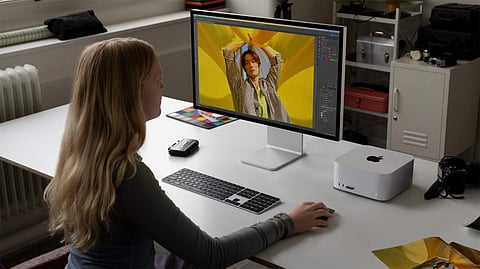
Apple shook up the desktop market last year with the launch of the Mac Studio, a computer that offered workstation-grade power for creative professionals and prosumers in a form factor no bigger than a couple of Mac minis stacked atop each other. With this year’s upgrade to the M2 series, those of you who are big on computing requirements with a budget to match -- the M2 Max and Ultra variants start at INR 2,09,900 and INR 4,19,900 respectively -– and short on space, look no further.
The 2023 Mac Studio’s external design is almost unchanged from its predecessor, which means it’s incredibly accessible and unassuming for a machine that packs in this much performance. It’s entirely possible to carry the Mac Studio from home to the office, should you need to.
Of course, you’ll have to bring your own keyboard, mouse and display, but the Mac Studio pairs perfectly with Apple’s Studio Display (INR 1,59,900), which plugs into one of the four Thunderbolt 4 ports on the rear. You can connect up to five displays on the M2 Max model I’ve reviewed.
In terms of the abundant connectivity options, you’re left with two USB-A ports, an HDMI port, 10 GB Ethernet and a headphone jack on the rear, and two additional USB-C ports and a SDXC card slot on the front, with Bluetooth 5.3, Wi-Fi 6E and HDMI 2.1 support (enabling 8K/60 Hz support).

Now, if you’re spending the big bucks on the Mac Studio, you’re likely to be the sort of person looking to make money on the creative workflows enabled by the added computing performance. For my review, I had the M2 Max (38-core GPU) variant with 96 GB of memory and 4 TB of storage (INR 4,29,900), and expectedly, the Mac Studio flew through everyday tasks, multitasking between heavy photo editing tasks and several browser windows and streaming apps… without even breathing hard!
Clearly, that wasn’t going to be enough, and so I called in a motley crew of video/audio creative professionals to truly take the Mac Studio through its paces. In Adobe Lightroom, the Mac Studio made quick work on selecting, processing and exporting 3,000 Canon RAW files, and it’s easy to see how the smallest fractions of a second selecting each file and finally exporting add up several minutes to a workflow when compared to the M1 Mac Mini I had on hand to test.
Moving on to Final Cut Pro, the video editor imported multiple streams of Apple ProRes and 8K footage, applied several colour corrections and music/visual effects, and the M2 Max handled the footage like it was nothing – no dropped frames or stutters, perfectly smooth scrubbing through previews and final exports rendering faster than the M2 Pro MacBook Pro I had handy for reference. This is the sort of workflow that would normally bring an Intel-powered MacBook Pro to crawl - the available headroom in the Mac Activity Monitor told us this would be an insanely capable workstation for years to come.
If you’re a creative pro on an older Mac, the M2 Max Mac Studio makes a ton of sense, even at its steep price point. Nothing else delivers this much performance in a form factor this desk-friendly, and unless your work requires you to use Windows, this sort of performance will pay for itself with the time savings and performance efficiencies it delivers.
Rating: 8/10
Price: INR 2,09,900 onwards